
How to spot hidden conversion leaks with an audit
A comprehensive CRO audit can uncover hidden conversion leaks that cost businesses up to 26% of their marketing budget, revealing opportunities for 15-30% revenue increases without additional traffic acquisition.
- Start with high-impact pages: Focus your audit on high-traffic, low-conversion pages with commercial intent rather than informational content to maximize improvement potential.
- Fix technical performance first: Page speed issues alone can kill conversions – sites loading in 1 second convert 3x better than those taking 5 seconds.
- Eliminate user experience friction: Test your site as a first-time visitor, streamline forms, and ensure clear navigation paths since 70% of visitors abandon sites with friction.
- Align messaging across touchpoints: Maintain consistency between ads and landing pages to boost conversions by up to 39% and use benefit-driven language over generic claims.
- Prioritize mobile optimization: With 53% of users browsing on mobile, responsive design and fast mobile load times are critical for preventing abandonment.
Remember that every second of friction in your customer journey represents lost revenue. A systematic audit approach – from technical performance to user experience to messaging alignment – transforms these hidden leaks into conversion opportunities.
Your website might be losing sales without you knowing it. A full CRO audit could show that you’re wasting 26 percent of your marketing budget due to hidden funnel problems. This hits businesses hard, regardless of their size.
Gartner’s research shows that companies can boost revenue by 15-30% when they find and fix conversion drop-off points – all without getting more traffic. But most industries only convert 2 to 5 percent of their visitors, and Shopify stores perform even worse at 1.4%. The numbers get worse when 70% of people abandon their purchase after running into problems on important pages.
A detailed website CRO audit can spot these hidden conversion funnel leaks. Every moment your customers spend dealing with friction leads to lost sales. Pages that need five seconds to load will likely cost you conversions. Our CRO audit checklist spots these problems and many more.
This piece walks you through everything you need to do a full website audit. You’ll learn where customers drop off and how to fix these conversion points that matter most.
Start with the right pages
What pages should you audit first to find conversion leaks?
Start with high-traffic pages that have low conversion rates and clear commercial intent. These pages offer the highest ROI because small improvements can unlock significant revenue gains without increasing traffic.
The right starting point for your CRO audit paves the way to quick, meaningful results. Your website’s pages need different levels of attention to find conversion leaks.
Identify high-traffic, low-conversion pages
A website CRO audit should target pages that get lots of traffic but fail to convert visitors. These pages offer the best chances to improve results. To cite an instance, a page with 15,000 monthly visitors and a 2.2% conversion rate could gain 150 more conversions each month from just a 1% improvement.
Your analytics will reveal outliers – pages that attract visitors but struggle to convert them need optimization. Companies often generate 20,000+ monthly sessions without seeing matching gains in pipeline or revenue. These hidden conversion leaks need your attention.
Focus on pages with commercial intent
Your CRO audit checklist review should skip informational or top-of-funnel content at first. Blog posts and educational resources might attract traffic but rarely drive direct conversions. The priority should be pages where visitors show commercial or transactional intent:
- Product pages that influence purchase decisions
- Landing pages designed specifically to convert
- Cart and checkout pages (often the final conversion hurdles)
- Pages where users sign up for demos or download resources
Most CRO audit services suggest working backward from the bottom of your pipeline. This strategy helps eliminate barriers that stop high-intent leads from converting.
Use analytics to prioritize audit targets
Pages with at least 10,000 monthly visitors provide enough data to work with. Your analytics can also show:
- Pages with highest bounce or exit rates
- Drop-off points in your conversion funnel
- Best and worst converting traffic sources
- User navigation patterns and stopping points
A clear roadmap emerges from categorizing pages based on traffic and conversion performance. Pages that get high traffic but zero conversions need immediate attention as they waste valuable chances to convert.
The best results come from focusing on pages that already get substantial attention but fail to turn visitors into customers.
Run a technical performance check
Technical problems can destroy conversion rates before visitors even see what you’re offering. A full CRO audit should look beyond analytics to get into your website’s core functionality.
Test page speed and load times
Your bottom line depends heavily on page speed. My experience shows conversion improvements of 7-15% just by fixing speed issues found during a website audit. The numbers tell a compelling story: websites loading in 1 second convert 3x higher than those taking 5 seconds. E-commerce conversion rates drop by 0.3% with each extra second of load time.
Core Web Vitals act as your technical performance indicators:
- Largest Contentful Paint (LCP): shows when the largest content element becomes visible
- First Input Delay (FID): measures how quickly your site responds to user interaction
- Cumulative Layout Shift (CLS): tells you about visual stability
Google PageSpeed Insights helps identify render-blocking resources, server response times, and ways to optimize images.
Check mobile responsiveness
Mobile optimization has become essential today. About 53% of mobile users leave websites that take more than 3 seconds to load. The bounce rates jump by 24.4% when page load times increase from 4 seconds to 8 seconds on mobile devices.
Your CRO audit checklist must verify that your site:
- Adapts naturally to different screen sizes
- Uses fluid grid layouts and flexible images
- Loads critical content first on mobile devices
- Switches to numeric keyboards automatically for payment information
Fix layout shifts and broken elements
Layout shifts drive users away and hurt conversions. A good CLS score (under 0.1) plays a vital role in user experience and rankings. Common problems include:
- Images lacking specified dimensions
- Ads and iframes without reserved space
- Dynamically injected content showing up after page load
- Web fonts causing text movement
Your website CRO audit should spot these issues using Chrome DevTools to highlight shifting elements. You can fix them by adding specific dimensions for all media and keeping space for dynamic content.

Audit the user journey and experience
How can you identify user experience friction during a CRO audit?
By navigating the site as a first-time visitor, testing forms, links, and CTAs, and mapping the full conversion path. Friction often appears as unnecessary steps, unclear messaging, or confusing navigation that causes users to abandon the journey.
Looking at your website through your customer’s eyes plays a vital role in a complete CRO audit. User experience reveals conversion barriers that analytics alone can’t uncover.
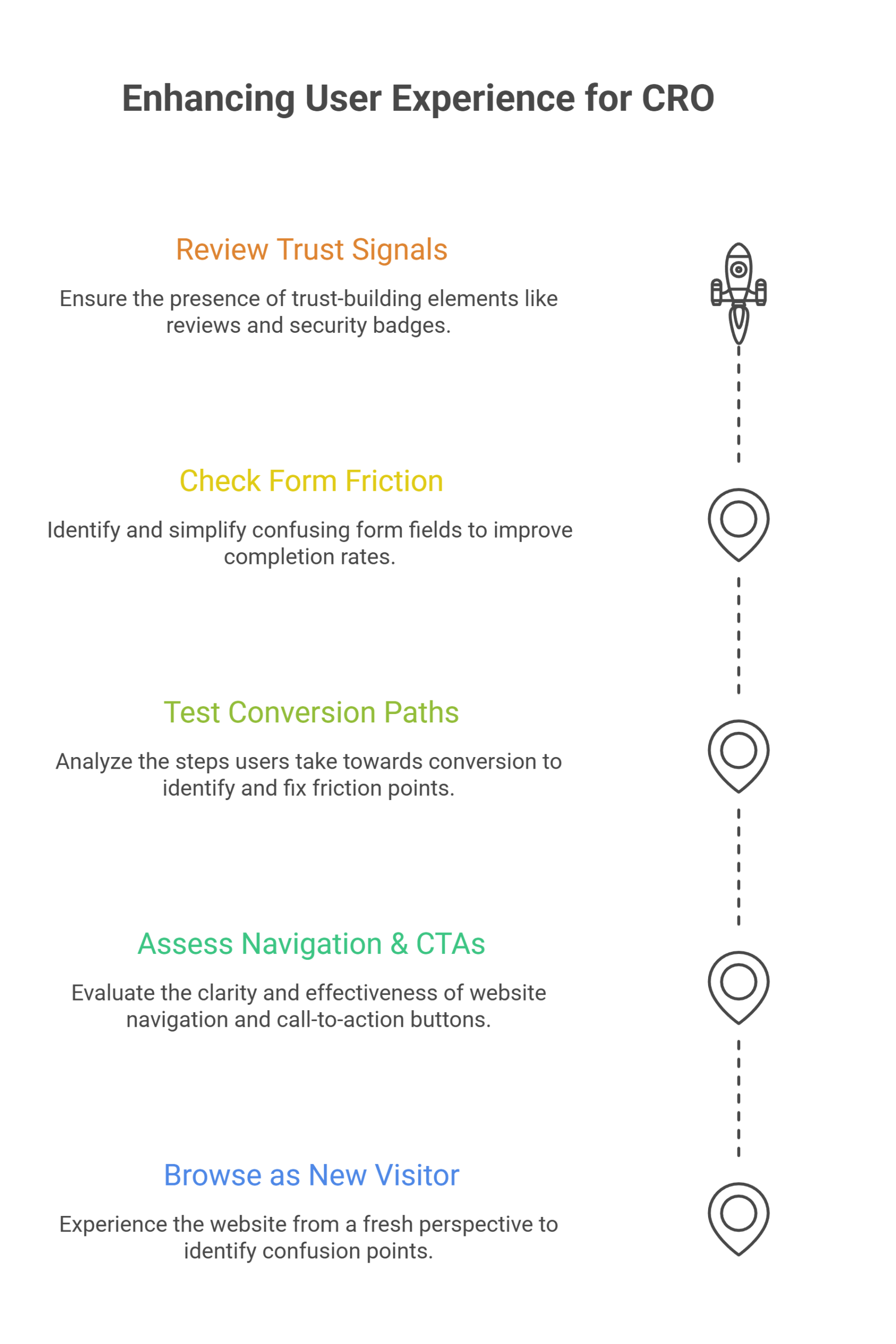
Browse as a first-time visitor
A new visitor’s viewpoint emerges when you browse your site without prior knowledge. This fresh approach helps you spot confusion points that regular users might miss. You should note overwhelming information, unclear messaging, or distracting elements that pull focus from your core offerings.
Assess navigation and CTAs
User experience depends heavily on clear navigation. Menu items should be easy to understand with logically grouped pages that guide users naturally through your site. Your CTAs need visual distinction, action-oriented language, and clarity about next steps. The word “submit” doesn’t belong on buttons—phrase CTAs as “I want to…” statements instead.
Test all links and conversion paths
Your conversion funnel needs careful analysis to spot where visitors leave. Cart abandonment happens 70% of the time globally, mostly because checkout processes become too complex. You need to document each step toward conversion and find friction points that make users abandon their carts.
Check for form friction and drop-offs
Each extra form field creates resistance and reduces completion rates. A form audit helps identify confusing fields or steps that drive users away. You could ask for a ZIP code instead of a full address.
Review trust signals and social proof
Trust matters—40% of consumers leave their carts due to security concerns. Customer reviews, security badges, clear return policies, and membership affiliations build credibility effectively.
Review content and messaging alignment
Why should mobile optimization be a priority in CRO audits?
Because more than half of users browse on mobile, and slow or poorly optimized mobile experiences cause high abandonment rates. Mobile-first audits prevent major conversion losses that desktop-only reviews often miss.
Poor content alignment kills conversions in any CRO audit. Research shows 70% of consumers leave websites when content doesn’t match their ad expectations.
Ensure copy matches user expectations
Your message should speak directly to your persona’s challenges and goals. You need standardized but flexible templates that map different content types to user personas. The right messaging puts customer goals and lifestyle at the center. This deepens customer participation and reduces bounce rates for each persona segment.
Check consistency across ads and landing pages
Matching messages between ads and landing pages can boost conversions up to 39%. Your visual branding should stay consistent with similar colors, fonts, and images across all touchpoints. Landing page headlines need to match the exact words used in your ads, especially when you have specific offers to promote.
Use persuasive, benefit-driven language
Put your visitors first, not your business. Let customer testimonials do the talking instead of making “world-class” or “best in industry” claims. Good persuasive copy answers “what’s in it for me?” right away. Yes, it is true that people buy based on emotion first and justify their purchases with logic later.
Line up CTAs with user intent
Your CTA should match where visitors are in their buying trip. Educational content works better with “Download the guide” than “Buy now” for awareness-stage visitors. Action words like “get,” “try,” and “download” push people to act now. Your website audit should verify that CTAs deliver the value they promise.
Conclusion
A full CRO audit uncovers conversion leaks that quietly drain your marketing budget and revenue. Your website might convert at just 2-5% when it could do much more, and hidden inefficiencies throughout your funnel could be the reason.
You should get into technical performance factors after spotting high-traffic, low-converting pages with commercial intent. Your conversion rates can succeed or fail based on page speed alone. Mobile optimization isn’t optional anymore – 53% of users browse on smartphones.
The user experience often reveals the full picture. Your conversion success depends heavily on first-time visitors’ views, simplified navigation paths, friction-free forms, and mutually beneficial trust signals.
Messaging that lines up between ads and landing pages can boost conversions by up to 39%. Benefit-driven language and well-placed CTAs complete your conversion optimization puzzle.
Finding these hidden conversion leaks takes dedication to the audit process. The investment makes sense even though it needs time and resources – you could see a 15-30% revenue bump without extra traffic. Note that every second of friction means lost conversions, while each improvement creates new ways to turn browsers into buyers.
Frequently Asked Questions
What is a CRO audit and why is it important?
A CRO (Conversion Rate Optimization) audit is a comprehensive analysis of a website to identify areas that may be hindering conversions. It’s crucial because it can uncover hidden inefficiencies that cost businesses up to 26% of their marketing budget and reveal opportunities for significant revenue increases without additional traffic.
How do I choose which pages to focus on during a CRO audit?
Start with high-traffic, low-conversion pages that have commercial intent. These pages represent the biggest opportunities for improvement. Prioritize product pages, landing pages, and checkout pages where visitors have demonstrated purchasing intent.
What technical aspects should I check during a CRO audit?
Key technical aspects to examine include page speed and load times, mobile responsiveness, and layout stability. Pay special attention to Core Web Vitals like Largest Contentful Paint (LCP), First Input Delay (FID), and Cumulative Layout Shift (CLS).
How can I improve the user experience on my website?
To enhance user experience, browse your site as a first-time visitor, evaluate navigation and CTAs, test all links and conversion paths, minimize form friction, and incorporate trust signals and social proof. These steps can significantly reduce abandonment rates and increase conversions.
Why is messaging alignment important in a CRO audit?
Messaging alignment between ads and landing pages can boost conversions by up to 39%. Ensure your copy matches user expectations, maintain consistency across all touchpoints, use persuasive benefit-driven language, and align CTAs with user intent to maximize conversion potential.

Author: Arsh Sanwarwala
Arsh Sanwarwala is the Founder and CEO at ThrillX. He is passionate about UX/UI Design, conversion optimization, and all things digital.