
The ultimate website audit checklist for 2026
A comprehensive website audit is your roadmap to digital success, addressing critical performance factors that determine whether visitors stay or abandon your site within seconds.
- Speed is critical: Sites taking over 3 seconds to load lose significant visitors, with just 1-second delays reducing conversions by up to 20%
- Technical SEO foundations matter: Ensure proper crawlability, HTTPS security, optimized meta tags, and schema markup for search engine visibility
- Content must align with user intent: Eliminate thin or outdated content, use natural keyword placement, and structure content for easy scanning
- Core Web Vitals are non-negotiable: Target LCP under 2.5 seconds, INP under 200ms, and CLS below 0.1 for optimal user experience
- Mobile-first approach is essential: With 60%+ traffic from mobile devices, responsive design and simplified navigation directly impact success
- Conduct quarterly audits: Regular comprehensive audits help identify emerging issues before they significantly impact performance and rankings
The digital landscape evolves rapidly, making consistent auditing your competitive advantage for sustained online success in 2026 and beyond.
Why is a comprehensive website audit essential in 2026?
A comprehensive website audit identifies performance, SEO, content, and UX issues that cause visitors to abandon a site within seconds. In 2026, regular audits are critical to maintaining search visibility, user trust, and conversion rates in a rapidly evolving digital landscape.
Your website audit checklist needs speed optimization, or you’ll lose visitors. A site that takes more than three seconds to load will cost you much of your potential visitors. Just one second of delay can reduce conversions by up to 20%.
Mobile users now generate more than 70% of web traffic. About 98% of visitors leave eCommerce sites without buying anything. A detailed website audit is a vital part of success in 2026. We’ve created this website audit checklist to help you spot and fix critical issues. The checklist template works great when you’re up against tough competition and need to know what your competitors are doing.
Visitors take less than eight seconds to decide if they’ll stay on your site. This checklist helps you create an experience that works for impatient users and search engines alike. Google considers speed one of the most important SEO factors.
SEO Audit Essentials
What technical SEO elements should every website audit include?
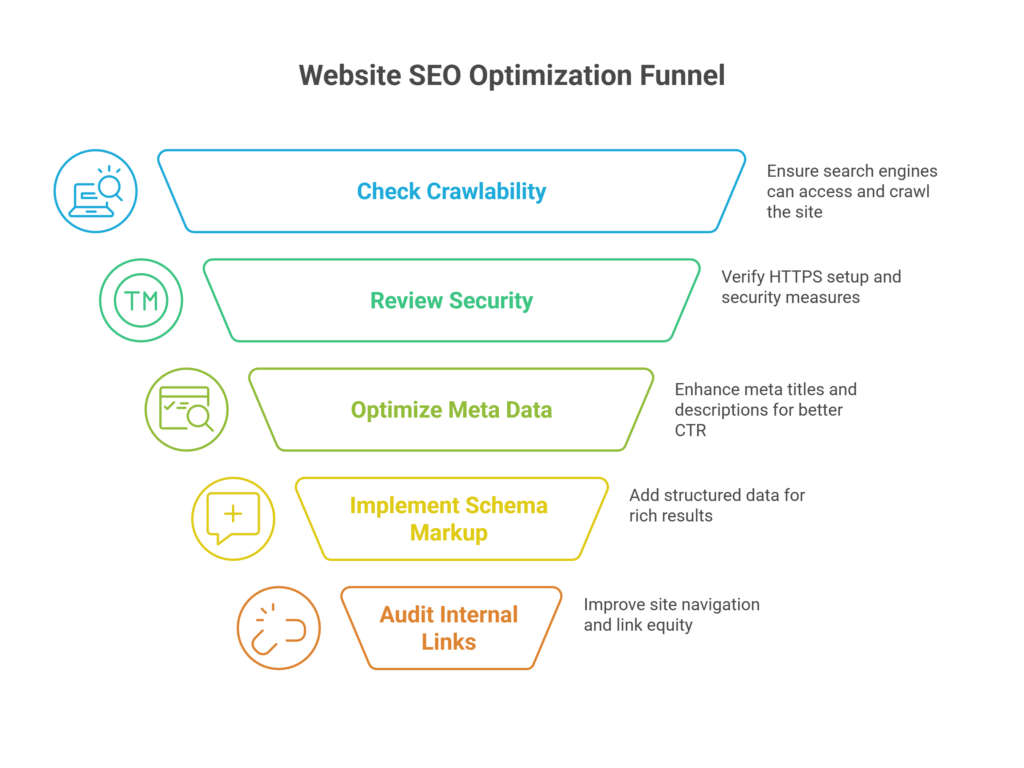
Every website audit should check crawlability, indexing status, HTTPS security, optimized meta titles and descriptions, structured data (schema markup), and a clean internal linking structure to ensure search engines can properly understand and rank the site.
A successful website audit checklist starts with making sure search engines can find and understand your content. Recent data shows these technical elements are the foundations of your site’s visibility in search results.
Check crawlability and indexing
Search engines need to crawl your site to find pages before they add them to their index. Your pages won’t show up in search results whatever the content quality without proper indexing. Regular site audits help you find crawl errors and track your indexability rate—Google’s indexed pages divided by your total pages. You might have some problems if this rate falls below 90%. Google might miss orphaned pages (pages without internal links pointing to them). The coverage report in Google Search Console lets you see how many pages are indexed and spots any problematic assets.
Review HTTPS and security setup
Security does more than just protect—it affects your SEO. Google has confirmed HTTPS encryption works as a “lightweight” ranking factor. Browsers show your site as “not secure” without HTTPS, which can scare visitors away. HTTP sites without encryption also let ISPs put unwanted ads into your pages. You should test your setup with Qualys’ SSL Server Test and try to get at least an A or A+ rating.
Optimize meta titles and descriptions
Meta descriptions don’t directly affect rankings, but they boost click-through rates by a lot. Titles should stay under 60 characters and descriptions around 155 characters to avoid getting cut off in search results. Put your main keyword naturally in titles, especially near the start. Your descriptions should use action-oriented language with a clear call-to-action at the end to get more clicks.
Use schema markup for rich results
Schema markup tells search engines exactly what your content means. Pages with structured data can then get visually enhanced rich results that take up more space on search results pages. These enhanced listings get more clicks than standard blue links. You’ll find common schema types like Recipe, Article, How-to, FAQ, and Product markups.
Audit internal linking structure
A solid internal linking strategy creates better crawl paths and spreads link equity across your site. You need to check for broken links, too many internal links on single pages, and redirect chains. Pages that matter should be within three clicks of your homepage, as Google might see deeper pages as less important. You can fix orphaned pages by adding relevant internal links that point to them.
Content and Keyword Audit
How do you evaluate content quality during a website audit?
Content quality is evaluated by checking for outdated or thin pages, matching content to search intent, using natural keyword placement, improving readability, and removing duplicate or overlapping pages that dilute SEO performance.
Your website audit checklist needs a complete content review beyond just technical aspects. Content fails when it doesn’t match what visitors want or how search engines read it.
Identify outdated or thin content
Poor or outdated content can hurt your site’s performance. Regular content audits help you spot pages with dropping traffic or engagement metrics. You should focus on low-value pages that lack detail, including those with few words or pages that no longer match your brand’s direction. A complete content audit should look at both performance and quality to decide whether you should update, unite, or remove underperforming content.
Arrange content with search intent
Search engines favor content that meets user needs over content that just has keywords. Knowing why people search for something keeps your content relevant. Looking at the top 5-10 search results for your target keywords helps you notice what users expect. Your rankings improve significantly when your content delivers what users want.
Keep keyword usage natural
Keyword stuffing doesn’t work anymore. Today’s search engines value relevance, context, and user intent over keyword density. You should target 1-2% keyword density to keep your writing balanced and reader-friendly. Natural writing flows smoothly, so if a keyword feels forced, try reframing the sentence or using a synonym.
Improve readability and structure
Even excellent content fails when it looks cramped or hard to read. Short paragraphs of 2-4 sentences work better. Headers should appear every 2-3 paragraphs to mark important sections. Bullets and numbered lists make scanning easier, and proper spacing between text lines improves readability.
Check for duplicate or overlapping pages
Duplicate content exists when similar content shows up at different URLs, which confuses search engines about the right version to display. This weakens link equity and reduces search visibility. Tools like Seobility can help you find duplicate content by crawling your entire site. You can fix duplication with canonical tags, 301 redirects, or by creating unique content for similar pages.
Website Speed and Technical Performance
Which performance metrics matter most in a modern website audit?
Core Web Vitals are the most important metrics: Largest Contentful Paint under 2.5 seconds, Interaction to Next Paint under 200ms, and Cumulative Layout Shift below 0.1. These directly impact user experience, rankings, and conversions.
Your website’s speed could determine its success or failure. A full website audit checklist must look at technical performance optimization to keep visitors from leaving.
Test Core Web Vitals (LCP, FID, CLS)
Google uses Core Web Vitals to measure real-life user experience. Your website audit steps checklist should meet these standards:
- Largest Contentful Paint (LCP): Good loading performance needs under 2.5 seconds
- Interaction to Next Paint (INP): Good responsiveness requires less than 200 milliseconds
- Cumulative Layout Shift (CLS): Visual stability should stay below 0.1
Compress and lazy-load images
Images take up 50-70% of a webpage’s total size. You can speed up initial page loads by lazy loading images. This means images load only when users scroll to see them. You should also convert images to newer formats like WebP or AVIF. These formats can shrink file sizes by 70-90% without losing quality.
Minify CSS, JS, and HTML
Code minification removes extra characters while keeping functionality intact. This process cuts out whitespace, comments, and unused code to create smaller files that download faster. Tools like HTMLMinifier, CSSNano, and UglifyJS help streamline your code.
Use a CDN and enable caching
Content Delivery Networks keep cached versions on servers worldwide. Users get content faster because it’s closer to them, which can cut load times in half. Browser caching helps too – it saves static assets on users’ devices, making return visits faster.
Review server response time
Your server should respond in less than 200ms. You can optimize database queries and use server-side caching to help with this. If needed, upgrade your hosting resources. Slow servers affect every page resource and make your site feel sluggish.
User Experience and Mobile Optimization
Why is mobile-first user experience critical in website audits?
With over 60% of traffic coming from mobile devices, mobile-first UX is critical. Poor responsiveness, complex navigation, slow load times, or weak CTAs on mobile directly increase bounce rates and reduce conversions.
Your website audit checklist should get into how visitors interact with your site. People make up their minds about your site’s trustworthiness in just 50 milliseconds. This makes user experience evaluation crucial.
Ensure mobile responsiveness
Mobile devices generate over 60% of website traffic. A responsive design has become non-negotiable. Your site should adapt smoothly across different devices and orientations. Mobile users expect a continuous experience and will abandon sites that need horizontal scrolling or have tiny, unclickable elements.
Simplify navigation and menus
Navigation quality directly affects user satisfaction. About 94% of users rate easy navigation as their top website priority. Desktop sites should avoid hiding navigation behind hamburger menus. Touch targets need at least 44×44 pixels on mobile. Sticky navigation works well for long pages.
Check accessibility compliance (WCAG)
WCAG guidelines make your site available to people with disabilities. These standards follow four principles: perceivable, operable, understandable, and robust. Many jurisdictions now require WCAG 2.1 Level AA compliance for government websites as of 2024.
Test conversion paths and CTAs
Map the path from landing page to conversion to spot and fix friction points. Strong CTAs need specific wording, action verbs, and a sense of urgency. They should also stand out visually. Mobile users need streamlined conversion paths with fewer steps and only essential content.
Review trust signals like SSL and testimonials
Security features boost visitor confidence and increase conversions. Trust badges, payment logos, and security certifications should appear clearly during checkout. Real customer testimonials serve as social proof. Never use fake reviews – they destroy trust completely.
Use heatmaps to analyze user behavior
Heatmaps show where users click, move, and scroll on your pages. This visual data reveals rage-clicking (a sign of frustration), content engagement patterns, and attention to key elements. Session recordings paired with heatmaps help you understand not just what users do, but why they do it.

Conclusion
Your website’s success in 2026 needs a complete audit as a roadmap. This guide covers key elements that determine online performance. Website speed matters the most, since visitors leave if pages take more than three seconds to load. On top of that, proper indexing and HTTPS setup are the foundations of search visibility.
Quality content still rules supreme. Your website should match search intent and stay readable without duplicate or thin content. Core Web Vitals and other technical metrics directly affect user experience and search rankings. Image optimization, code minification, and server response time need your focus right away.
Visitors stay or leave based on mobile responsiveness, easy navigation, and clear conversion paths. Making your site accessible helps reach more people and prevents legal troubles. Trust signals help convince uncertain visitors to take action.
Running thorough website audits every quarter makes good business sense. You can spot issues before they hurt your performance by a lot. The digital world changes faster each day, and what worked yesterday might not work tomorrow. Your audit checklist needs to grow with new technology and user needs.
Websites that pass complete audits beat their competition in every way – from search rankings to customer loyalty. Regular audits lead to better performance, stronger user trust, and improved business results. Start using this checklist now to turn your digital presence into a powerful asset for 2026 and beyond.
Frequently Asked Questions
How often should I conduct a website audit?
It’s recommended to perform a comprehensive website audit at least quarterly. This frequency allows you to identify and address emerging issues before they significantly impact your site’s performance. However, for businesses in fast-moving industries or those with frequent content updates, monthly reviews may be beneficial.
What are the key elements to focus on in a website audit for 2026?
A thorough website audit should cover several crucial areas: SEO essentials (including crawlability and indexing), content quality and keyword usage, website speed and technical performance (with emphasis on Core Web Vitals), user experience, and mobile optimization. Pay special attention to loading speed, as delays of just a few seconds can significantly impact user retention and conversions.
How important is mobile optimization in a website audit?
Mobile optimization is critical, given that over 60% of website traffic now comes from mobile devices. Your audit should ensure that your site is fully responsive across various devices and screen sizes. This includes checking for easy navigation, appropriate touch target sizes, and streamlined conversion paths for mobile users.
What tools can I use to conduct a website audit?
There are several tools available for different aspects of a website audit. For SEO and technical audits, tools like Screaming Frog, SEMrush, or Ahrefs can be helpful. For performance testing, consider using Google’s PageSpeed Insights or GTmetrix. For user behavior analysis, heatmap tools like Hotjar can provide valuable insights.
How does website speed affect my site's performance?
Website speed is crucial for both user experience and search engine rankings. If your site takes more than three seconds to load, you risk losing a significant portion of potential visitors. Even a one-second delay can reduce conversions by up to 20%. Optimizing images, minifying code, and leveraging browser caching are some ways to improve your site’s speed.

Author: Arsh Sanwarwala
Arsh Sanwarwala is the Founder and CEO at ThrillX. He is passionate about UX/UI Design, conversion optimization, and all things digital.