
WordPress vs Webflow vs Shopify: Which Drives Business Growth?
Choosing the right platform depends on your business priorities, technical expertise, and growth strategy. Here are the essential insights to guide your decision:
WordPress offers maximum flexibility with 43% market share and unlimited customization through plugins, but requires technical maintenance and separate hosting ($15-100/month)
Shopify excels for pure e-commerce with fastest setup, built-in payment processing (2.4-2.9% fees), and 99.9% uptime, ideal for product-focused businesses
Webflow bridges design and functionality with pixel-perfect visual control and no coding required, though CMS limits (2,000-10,000 items) may constrain large content sites
SEO capabilities vary dramatically – WordPress dominates with advanced plugins like Rank Math, while Shopify has basic features and rigid URL structures that limit optimization
Total cost of ownership differs significantly – WordPress has lowest long-term costs but higher maintenance, while Shopify ($39-399/month) and Webflow ($14-212/month) offer predictable pricing with managed infrastructure
The winning platform aligns with your core business model: choose WordPress for content-driven flexibility, Webflow for design-first brands, or Shopify for streamlined online selling.
Your business’s digital future depends on choosing between Shopify and WordPress. WordPress stands as the most popular CMS and powers over 43% of all websites worldwide. Shopify dominates 28% of the e-commerce market, making it a strong contender.
Both platforms pack powerful advantages for e-commerce. WordPress becomes a powerhouse when combined with WooCommerce, which runs over 20% of all e-commerce sites globally. Shopify leads the e-commerce space with tools that make online selling simple. The numbers speak for themselves – Shopify boasts more than 4.4 million active sites and lets users sell and ship products to more than 175 countries globally.
This piece will guide you through these choices. Each platform meets different business needs. WordPress gives you unlimited flexibility for content-driven businesses. Design-conscious brands love Webflow, while Shopify makes online sales smooth and easy. Our goal is to help you pick the platform that matches your business growth goals best.
1. Ease of Use and Setup Experience
Which platform is easiest to set up and manage?
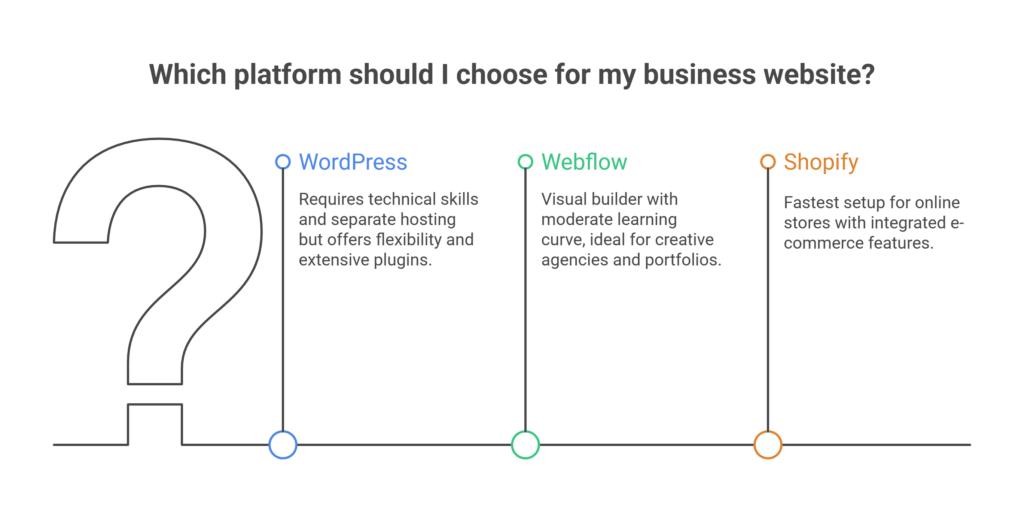
Shopify is the easiest platform to set up and manage, offering an all-in-one solution with hosting, security, and payments included. Webflow requires a moderate learning curve but avoids coding, while WordPress demands the most technical involvement due to separate hosting, plugins, and ongoing maintenance.
The original setup experience of a platform sets the tone for your entire business website experience. Each platform has its own way to get you online and they need different levels of technical skills. Let’s get into how these three platforms match up when it comes to how available they are and how easy they are to use for businesses with different technical abilities.
WordPress: Hosting and plugin setup required
WordPress installation is straightforward and takes less than five minutes to complete. You’ll need to get web hosting separately though, which can cost anywhere from $15 to over $100 per month based on your traffic needs. Unlike all-in-one solutions, you just need to handle several setup parts:
Creating a database manually or through hosting tools
Uploading WordPress files to your server
Configuring WordPress settings through the installation wizard
Installing plugins you need for security, SEO, and functionality
This multi-step process can feel overwhelming at first for non-technical users. Many hosting providers now offer one-click WordPress installation tools like Fantastico, but you’ll still need to manage plugin installation and updates yourself. Page builders like Gutenberg or Elementor help make content creation easier, but the platform needs more technical knowledge than its competitors.
Webflow: Visual builder with moderate learning curve
Webflow shines with its powerful visual canvas that lets you create sites without code through a user-friendly drag-and-drop interface. The platform turns your visual designs into clean code automatically, making it available to designers who don’t code. Despite these benefits, becoming skilled at Webflow takes more time than template-based website builders.
Learning Webflow can take anywhere from days to months depending on where you start and what you want to achieve. Webflow University helps with free, bite-sized video tutorials that walk you through the platform step by step.
Webflow’s real strength lies in its pixel-perfect control over every element on the page. This precise design control makes it perfect for creative agencies, high-end portfolios, or brand-conscious businesses where looks really matter.
Shopify: Fastest setup for online stores
Shopify offers the most simplified path to launching an online store among these three platforms. Its guided setup process needs no coding knowledge and has everything you need for e-commerce from day one. New users get:
Integrated hosting with automatic updates and security
Built-in payment processing through Shopify Payments
Ready-to-use shopping cart, tax calculations, and inventory management
SSL certification included by default
This all-in-one approach makes Shopify really easy to use for businesses starting their first online venture. On top of that, it offers a 14-day free trial so you can explore the platform before committing to a payment plan.
Shopify’s setup process is quick and simple. This gives it a clear advantage over WordPress for businesses that want to focus on selling products rather than custom design or content creation.
2. Design Flexibility and Customization
Which platform offers the best design flexibility?
Webflow offers the highest level of visual design flexibility with pixel-perfect control and advanced animations without coding. WordPress provides unlimited customization through themes and code access, while Shopify prioritizes conversion-optimized themes over deep visual customization.
Design is the foundation of your business website’s look and function. Each platform has its own way of handling customization that works for different skill levels and business needs.
Theme Control: WordPress vs Webflow vs Shopify
WordPress leads the pack with thousands of themes and top-level design control. You can customize anything you want thanks to its open-source nature. The massive theme ecosystem has both free and premium options that work for different business needs while keeping responsive design principles intact.
Webflow shines as a design-first platform that gives you complete creative freedom. Designers can control every pixel without needing to know much code. You can create custom animations, interactions, and dynamic layouts without plugins or heavy coding.
Shopify has over 70 professionally designed themes with nine free options built for e-commerce. The themes might be fewer than WordPress, but they focus on converting visitors and creating standardized checkout experiences that customers trust.
Visual Editing: Gutenberg vs Webflow Designer vs Shopify Editor
WordPress’s Gutenberg editor has grown better with live block commenting, review assignments, and detailed version control. Marketing teams can now swap images or edit copy much faster with these shared tools.
Webflow Designer lets you control every visual element on your site. Users can build layouts, interactions, and animations without touching code through its easy-to-use interface. The AI site builder can create homepages and style guides in minutes, which cuts down design time by a lot.
Shopify’s newest drag-and-drop editor in Online Store 2.0 helps non-technical founders rearrange page sections, keep reusable blocks, and see changes live. The editor is simple but doesn’t give you as much freedom as Webflow’s visual canvas.
Custom Code Access: PHP vs HTML/CSS vs Liquid
WordPress gives developers full access to PHP, CSS, and JavaScript to customize everything. This makes it perfect for businesses that need unique features beyond basic templates.
Webflow creates clean HTML and CSS that lets designers work without code while giving developers complete access to make changes. It bridges the gap between visual design and code creation.
Shopify uses Liquid, its own templating language, to customize themes. You need special knowledge to use Liquid, but it lets developers control how stores look and add custom features. The theme setup has front-end files, layout templates, sections, snippets, and assets folders to keep everything organized.
The platform that works best for you depends on what matters more – design control or easy setup as you grow your business.

3. SEO and Content Marketing Capabilities
Which platform is best for SEO and content marketing?
WordPress is the strongest platform for SEO and content marketing due to advanced plugins like Rank Math and full control over URLs, metadata, and schema. Webflow delivers clean code and solid built-in SEO features, while Shopify covers SEO basics but limits advanced optimization with rigid URL structures.
Search engine visibility and content marketing prowess can significantly impact your business’s online growth trajectory. Each platform offers distinct approaches to SEO and content creation that directly affect your ability to attract and engage potential customers.
SEO Plugins and Tools: Rank Math vs Built-in vs Shopify Apps
WordPress dominates the SEO landscape through its extensive plugin ecosystem. Tools like Rank Math and Yoast SEO provide comprehensive control over everything from metadata to schema markup, redirects, XML sitemaps, and robots.txt files. These plugins offer real-time feedback and advanced controls that make WordPress the undisputed SEO champion for businesses serious about organic traffic.
Webflow, primarily, relies on clean code and built-in SEO features. The platform automatically generates SEO-friendly title tags, descriptions, H1 tags, and URLs from page titles while providing auto sitemap generation. Its high-performance hosting and CDN support Core Web Vitals, which directly influences search rankings.
Shopify covers SEO basics with customizable H1, title and meta tags, and SEO-friendly URLs. For more advanced optimization, businesses must turn to Shopify’s App Store, though these tools typically don’t match the depth of WordPress alternatives. One notable limitation is Shopify’s rigid URL structure with forced prefixes like “/products/” that cannot be removed.
Content Structure and Blogging: WordPress vs Webflow vs Shopify
WordPress excels at content marketing due to its blogging origins. The platform provides unmatched flexibility for creating, organizing, and optimizing large volumes of articles – the foundation of successful content strategies.
Webflow’s CMS offers remarkable flexibility, allowing you to use the same system that powers your store to build and publish blog posts, case studies, and testimonials. Certainly, its main drawback lies in potential CMS limitations for large-scale content marketing due to item limits in pricing plans.
Shopify’s blogging capabilities are more basic, often described as simply “checking the ‘we blog’ tickbox”. The platform limits you to content types and formats your template allows, making it less ideal for businesses where content marketing drives significant traffic.
URL and Metadata Control: Full vs Partial vs Limited
WordPress offers unparalleled control over on-page SEO elements including meta titles, descriptions, and URL structures. This level of granular control makes it particularly effective for implementing comprehensive SEO strategies.
Webflow provides solid control over essential on-page SEO elements like meta tags, alt text, and Open Graph settings. You can edit URL slugs and implement schema markup manually, though it lacks the automation of WordPress plugins.
Shopify imposes frustrating limitations that can hinder advanced SEO efforts, particularly with its rigid URL structure. Throughout the platform, you’ll find forced URL prefixes for products (/products/) and blog posts (/blogs/), creating potential challenges for keyword-optimized URLs.
4. E-commerce Features and Store Management
Which platform scales best for e-commerce growth?
Shopify scales best for e-commerce growth with built-in infrastructure, 99.9% uptime, and automated handling of traffic spikes. WooCommerce can scale with the right hosting and technical setup, offering more control, while Webflow is better suited for smaller or mid-sized stores with simpler requirements.
Your online store’s success depends on the e-commerce engine you choose. Each platform has its own way of handling products, payments, and growth that will affect how well your business runs day-to-day.

Product Management: WooCommerce vs Webflow vs Shopify
Shopify gives you a complete toolkit built just for online selling. The platform has everything store owners need to get started: product management, inventory tracking, shipping integrations, and built-in payment processing. All these tools combine smoothly because they’re part of one system.
WooCommerce turns WordPress into a powerful e-commerce engine with its open-source framework. The plugin lets you customize products in many ways—you can sell physical items, digital downloads, memberships, courses, or subscriptions. But you’ll need to put together different plugins to build a complete selling system.
Webflow works well for smaller stores but doesn’t have the depth of other platforms. You can create product pages and track simple inventory, but you won’t find advanced features like multi-warehouse inventory management.
Payment Gateways and Fees: Stripe, PayPal, Shopify Payments
Shopify Payments processes transactions at rates from 2.4%-2.9% + 30¢ each. Using other payment gateways costs an extra 0.5%-2% in platform fees. Shop Pay, Shopify’s one-click checkout, can increase sales by up to 50% compared to guest checkout.
WooCommerce doesn’t charge any platform fees no matter which payment gateway you use. This saves you money, especially if you process many orders. On top of that, it works with many payment providers like Stripe and PayPal.
Webflow’s e-commerce plans support major payment processors including Stripe, PayPal, and Apple Pay through Webflow Payments, without any extra fees.
Shopify vs WordPress WooCommerce: Which scales better?
Shopify makes growing easy with 99.9% uptime and a track record of over 5.5 billion processed orders. The platform handles everything automatically as you grow, so you don’t have to worry about technical issues.
WooCommerce’s ability to grow depends on your hosting setup. This needs more technical know-how but gives you complete control over your store. You get more room to customize with WooCommerce, but you’ll need to manage more things yourself as your business expands.
5. Cost, Performance, and Scalability
Choosing the right platform requires a deep look at both upfront costs and technical implications down the road. Your business’s growth potential depends on getting this financial and performance equation right.
Original and Long-Term Costs: Hosting vs SaaS Plans
WordPress comes with free software but needs separate investments. Monthly hosting costs run from $5-$100, plus extra costs for premium themes and plugins. This setup will give you lower expenses over time, as you only pay for maintenance and occasional upgrades.
Webflow keeps things simple with a tiered subscription model. Monthly plans cost between $14-$212, and prices go up as your site expands. The CMS plan at $23/month works great for blogs and content sites, while the Business plan at $39/month handles more traffic.
Shopify packages everything together starting at $39/month for simple plans, going up to $399/month for advanced features. You’ll also need to factor in transaction fees (unless you use Shopify Payments) and app subscriptions that tend to cost more over time. When evaluating total investment, it’s worth understanding how much a Shopify store costs to build, especially if long-term growth and conversions are a priority.
Performance Optimization: Manual vs Built-in CDN
WordPress performance comes down to how you set it up. Speed can be excellent with a good host, light theme, and proper optimization, but you’ll need to set up caching, image optimization, and CDN integration yourself.
Webflow and Shopify take care of CDN delivery and optimization tools automatically. Your site loads quickly across all devices and regions without needing technical know-how. Content loads by a lot faster because CDNs serve it from servers located near your visitors.
Scalability: CMS Limits vs Plugin Ecosystem vs Shopify Plus
WordPress lets you scale without limits through its vast plugin ecosystem. You can add features as your business grows without hitting content restrictions, though you’ll need to handle more technical maintenance.
Webflow sets specific boundaries with plan-based CMS item limits (usually 2,000-10,000 items). Growing stores often turn to Shopify Plus for enterprise-level tools, higher technical limits, and automated processes. This makes it perfect for high-volume businesses that expect sudden traffic spikes.
Comparison Table
Feature | WordPress | Webflow | Shopify |
Market Share | 43% of all websites | Not mentioned | 28% of e-commerce |
Setup Complexity | Technical setup required; hosting needed | Moderate learning curve | Fastest setup; all-in-one solution |
Hosting Cost | $15-$100/month | Included in plans | Included in plans |
Platform Cost | Free (software only) | $14-$212/month | $39-$399/month |
Design Flexibility | Thousands of themes; unlimited customization | Pixel-perfect control; visual builder | 70+ e-commerce optimized themes |
Code Access | Full PHP, CSS, JavaScript access | Clean HTML/CSS output | Limited (Liquid templating) |
SEO Capabilities | Extensive via plugins (Rank Math, Yoast) | Built-in SEO features; auto-sitemap | Simple SEO features; app store extensions |
URL Control | Full control | Solid control | Limited; forced URL structure |
Content Management | Unlimited; excellent for blogging | CMS item limits (2,000-10,000) | Simple blogging capabilities |
E-commerce Features | Via WooCommerce; highly customizable | Simple e-commerce features | Complete built-in features |
Payment Processing | No platform fees | No transaction fees on e-commerce plans | 2.4-2.9% + 30¢ per transaction |
Scalability | Depends on hosting setup | Limited by CMS caps | Built-in scalability; 99.9% uptime |
Technical Maintenance | High (self-managed) | Low (managed platform) | Low (managed platform) |
Conclusion
Your business needs, technical skills, and growth plans will help you pick the right platform. WordPress leads the pack as the most flexible choice. It has a huge market share and lets you do anything you want with its plugins and full code access. But this flexibility means you’ll spend more time on technical maintenance and face a steeper learning curve.
Design-focused businesses might find Webflow hits the sweet spot. You can build exactly what you want without knowing much code, thanks to its visual builder. In spite of that, CMS limits could hold back content sites that grow faster or need to handle lots of content.
Shopify rules the e-commerce world with its easy setup and built-in features. It works best for businesses that sell products rather than create content. The platform limits some customization and URL options, but you won’t have to worry about technical issues as your store gets bigger.
Looking at costs, WordPress costs less in the long run but you’ll pay for hosting and maintenance separately. Webflow and Shopify charge predictable monthly fees that include hosting and support. Just keep in mind costs might go up as your business grows.
Each platform performs differently. WordPress’s speed depends on how you set it up. Webflow and Shopify come with CDNs and managed systems that make everything run smoothly. Scaling works differently too. WordPress can grow endlessly with plugins if you know what you’re doing. Shopify’s enterprise options handle high traffic easily without much technical work from you.
Take a good look at what matters most to your business before you decide. WordPress fits if you want total control and focus on content marketing. Webflow makes sense for brands that care about design but don’t want to deal with code. Shopify shines if you just want to sell without fussing over custom features. The best platform matches your growth plans, technical team, and long-term online goals.
Frequently Asked Questions
Which platform is best for e-commerce businesses?
Shopify is generally considered the best platform for e-commerce businesses. It offers a comprehensive toolkit specifically designed for online selling, including integrated product management, inventory tracking, shipping integrations, and built-in payment processing.
How do WordPress, Webflow, and Shopify compare in terms of design flexibility?
WordPress offers the most design flexibility with thousands of themes and unlimited customization options. Webflow provides pixel-perfect control through its visual builder without requiring extensive coding. Shopify has fewer themes but they are optimized for e-commerce and conversion.
What are the cost differences between these platforms?
WordPress has the lowest potential long-term costs but requires separate hosting and maintenance. Webflow and Shopify offer predictable monthly subscription pricing that includes hosting, ranging from about $14-$400 per month depending on the plan and platform chosen.
How do SEO capabilities differ across these platforms?
WordPress offers the most comprehensive SEO tools through plugins like Rank Math and Yoast SEO. Webflow provides built-in SEO features and clean code. Shopify covers SEO basics but has some limitations, particularly with URL structures.
Which platform is easiest to set up and use?
Shopify offers the fastest and most straightforward setup process, especially for e-commerce stores. It provides a guided setup and includes everything needed to start selling online immediately. WordPress requires more technical setup, while Webflow has a moderate learning curve for its visual builder.

Author: Arsh Sanwarwala
Arsh Sanwarwala is the Founder and CEO at ThrillX. He is passionate about UX/UI Design, conversion optimization, and all things digital.